
Upcoming changes to Snowflake Workspace access (January rollout)
In the upcoming days, we’ll be rolling out a set of changes that affect direct access to Snowflake Workspaces for Multi-tenant (MT) and Pay-As-You-Go (PAYG) Snowflake projects.
These changes are part of our effort to improve security across the Keboola platform and follow Snowflake’s policy of accessing shared accounts. Below you’ll find a detailed timeline and guidance on how to continue working with SQL and BI tools.
For full background, see the documentation.
What’s changing
We’re rolling out three related changes, each applied progressively over the next days.
1. UI update – Workspace “Connect” button removed
Wednesday, January 7
Starting January 7, the Keboola UI will no longer allow connecting directly to Snowflake Workspaces:
- The “Connect” button will be removed from the UI
- Existing connections won’t be affected yet, but connecting through “Connect” button will not be possible
- For debug purposes, affected users will be able to access Workspace Credentials by clicking on the Workspace ID
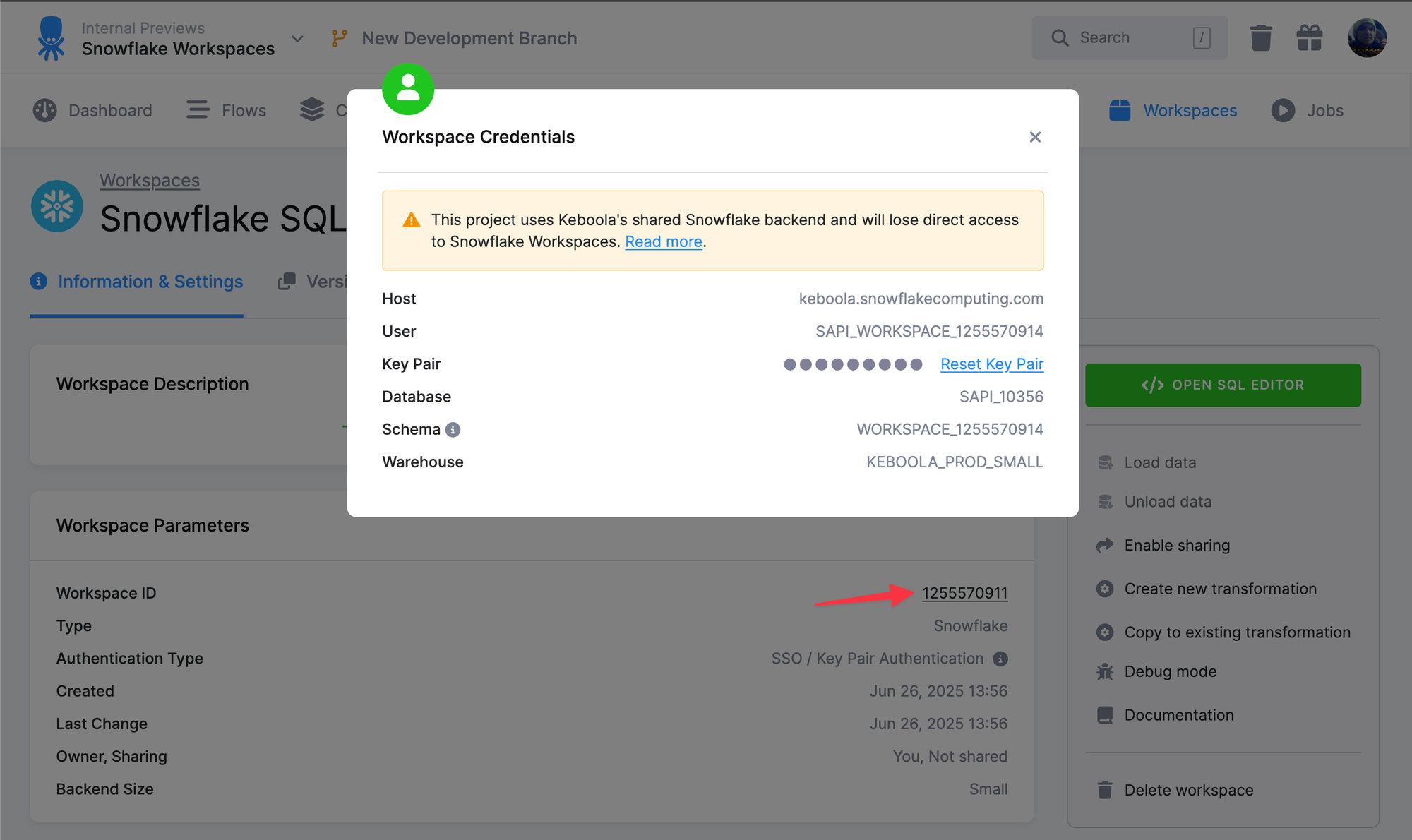
This is a UI-only change and the first step of the rollout.
2. Direct access disabled for newly created Snowflake Workspaces
Wednesday, January 7 – Thursday, January 8 (stack-dependent)
From this point on, new Snowflake Workspaces will no longer allow direct access, even outside the UI.
Planned rollout by stack:
- Azure EU – Wed, Jan 7
- GCP US – Wed, Jan 7
- AWS US – Thu, Jan 8
- AWS EU – Thu, Jan 8
- GCP EU – Thu, Jan 8
3. Direct access disabled for existing Snowflake Workspaces
Thursday, January 8 – Friday, January 16 (stack-dependent)
Finally, we’ll disable direct access for existing Snowflake Workspaces.
Planned rollout by stack:
- GCP US – Thu, Jan 8 - Fri, Jan 9
- Azure EU – Mon, Jan 12 - Fri, Jan 16
- AWS US – Mon, Jan 12 - Tue, Jan 13
- AWS EU – Mon, Jan 12 - Tue, Jan 13
- GCP EU – Mon, Jan 12 - Tue, Jan 13
Who is affected
These changes apply only if all of the following are true:
- You are using a Multi-tenant or Pay-As-You-Go Snowflake project
- Your project is not scheduled for migration to dedicated backend
Projects outside of these conditions are not affected.
How to work with SQL and BI tools going forward
If you’re losing direct access to Snowflake Workspaces, here are the recommended paths forward:
SQL development → SQL Editor
Use the built-in SQL Editor for querying, transformations, and development directly in Keboola: https://help.keboola.com/workspace/sql-editor/
BI tools & external access → Data Gateway
Connect BI tools securely and in a controlled way using Data Gateway: https://help.keboola.com/components/applications/data-gateway/
Looking ahead 🚀
While this change may require a short adjustment, it unlocks a more secure and consistent workflow across the Keboola platform. The SQL Editor and Data Gateway are powerful, first-class tools designed to cover the most common SQL and BI use cases—without the operational overhead of direct workspace access.
If you have questions or need help transitioning, our support team is here to help.