
New input load types for BigQuery — smarter loading with Clone
We've improved how Storage tables are loaded into your BigQuery transformations and workspaces. BigQuery now supports the same smart load-type selection that Snowflake already uses — Keboola can pick the best method automatically for each input table.
Update (July 16, 2026): transformations using SELECT * EXCEPT(_timestamp) may fail
As the Default Load Type = View setting is being retired (the last projects were switched over on July 15, 2026), some BigQuery transformations may start failing with:
Column _timestamp in SELECT * EXCEPT list does not existWhy this happens
_timestamp is an internal Storage metadata column, not part of your data. It used to be visible inside transformations only because the old default loaded input tables as live Views over Storage, which exposed that column.
With the new load types this is no longer guaranteed:
- Clone — a full whole-table load; the clone still carries
_timestamp. - Copy — used whenever you select only some columns, filter rows, retype, or load incrementally. A Copy contains only your data columns — not
_timestamp.
So any transformation that hardcodes SELECT * EXCEPT(_timestamp) — assuming the column is always present — now breaks as soon as its input is loaded via Copy.
How to fix it
1. Recommended — update the transformation. Remove _timestamp from the EXCEPT (...) list. _timestamp is an internal Storage column and should not be referenced in transformation SQL; the new load types no longer expose it in the general case. This is the durable fix and is independent of the load type.
2. Keep your SQL — pin the input Load Type to Clone. In the transformation's input mapping, set the table's Load type to Clone. A clone carries the full table including _timestamp, so SELECT * EXCEPT(_timestamp) keeps working with no SQL change. Note: this does not apply when you need column selection, row filtering, or incremental loading — those always use Copy.
3. Temporary unblock — re-enable the legacy View default. The bigquery-default-im-view project feature restores the previous behavior and can be enabled by a project admin under Project Settings → Features. Treat this as a stop-gap only — the View default is being retired, so plan to move to option 1 or 2.
If you need help identifying which transformations are affected, contact Keboola Support.
What's new
Three loading methods are available, and an Auto mode picks the best one per table:
- View — the workspace points at the live Storage table, so you always read the current data. (Today's default for most projects.)
- Clone — the workspace gets its own independent, point-in-time snapshot of the table. Created instantly, uses virtually no extra storage, and behaves like a normal standalone table.
- Copy — a full physical copy of the data; used only when neither Clone nor View applies.
When Clone is the default, Keboola chooses automatically:
- Clone for a normal whole-table load from your own project.
- Falls back to View for tables that can't be cloned but can still be referenced live (linked/shared tables and aliases).
- Falls back to Copy when you filter rows or select/retype only some columns.
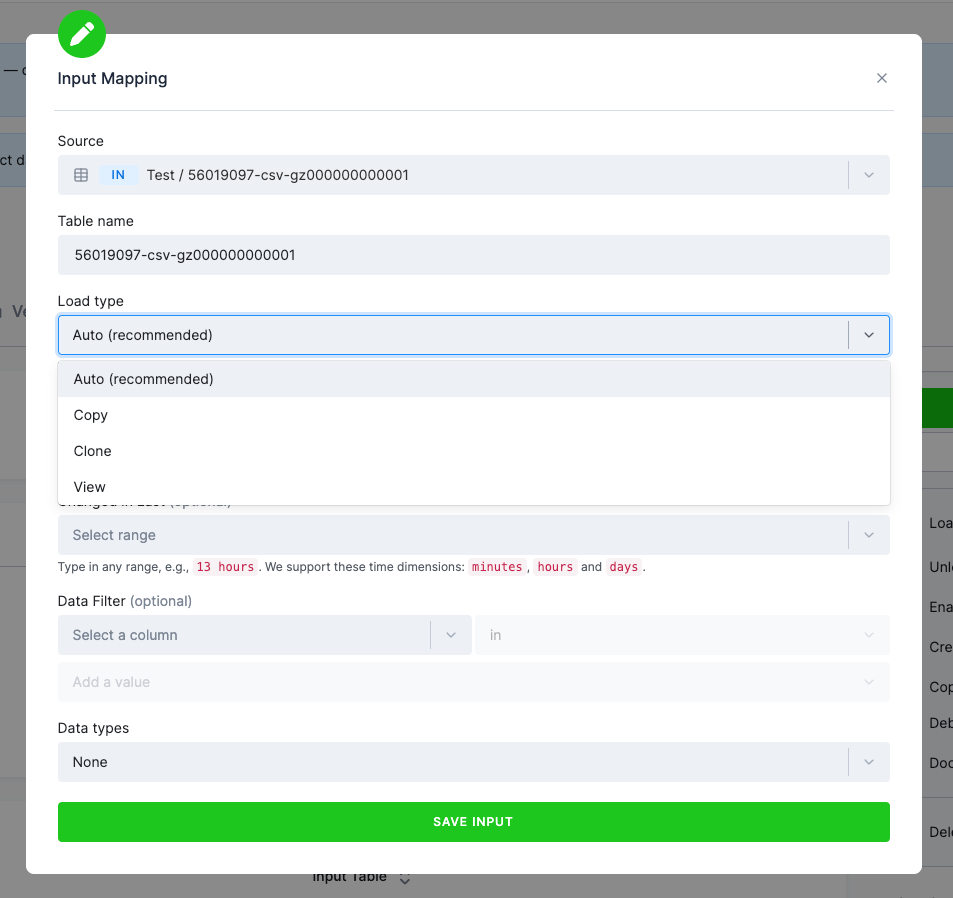
You can always override this per table with the Load type option in the input mapping (Auto / Copy / Clone / View).
Which method applies to which table
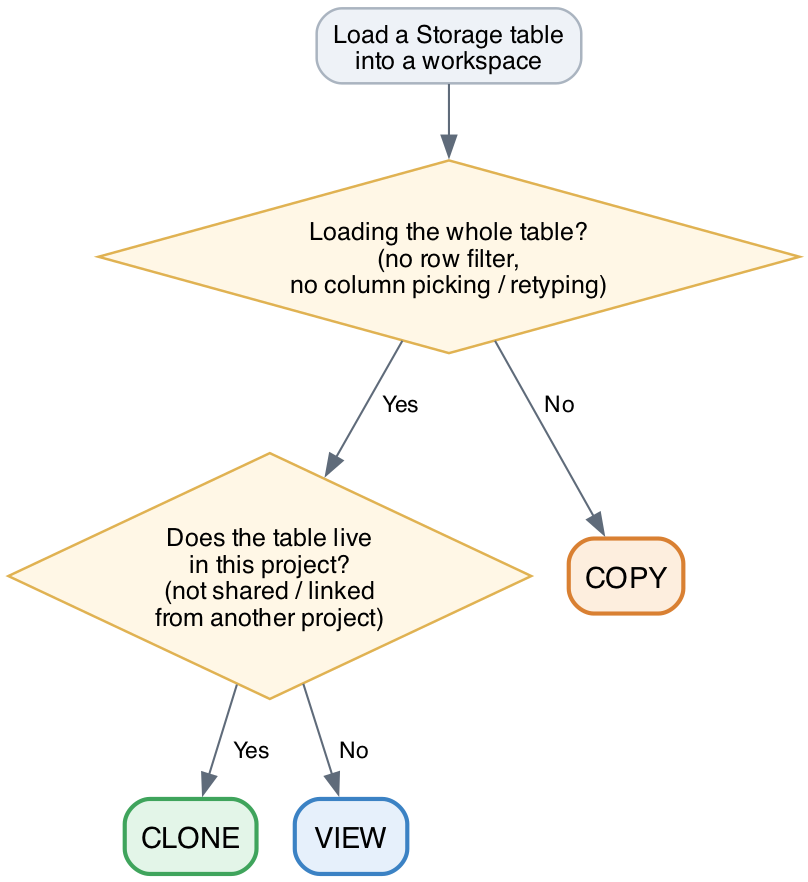
In practice the method is decided by the kind of table and what you ask Keboola to do with it:
- Clone — the standard case: a regular Storage table that lives in your own project, loaded as a whole table (no filters, no column selection or data-type changes, not incremental). The workspace gets an independent, point-in-time copy that behaves like a normal table.
- View — used for tables that can't be cloned but can still be read live: linked / shared tables (data shared into the project from another project), external tables, and alias tables. They're loaded as a read-only view and marked with a view icon in the input mapping.
- Copy — used whenever the load is not a plain whole-table load: you filter rows, select or retype only some columns, or load incrementally. Neither Clone nor View can do that, so Keboola makes a real physical copy.
In short: a whole-table load of your own data is cloned; a shared, external, or alias table becomes a live view; and any filtered, column-shaped, or incremental load is copied.

What's the default today?
Most BigQuery projects currently default to View — and that's perfectly fine. Nothing changes for you; your transformations and workspaces keep working exactly as before.
Want Clone as your default now?
Turn off the BigQuery Input Mapping – Default Load Type View feature in your project's Settings → Features. With it disabled, new input loads default to Clone (with the automatic View/Copy fallbacks above).
Heads-up — Clone becomes the default for everyone
We'll be gradually disabling the Default Load Type View feature across all BigQuery projects, completing by July 15, 2026. After that, Clone will be the default load type on BigQuery, bringing it in line with Snowflake.
Why Clone is better
- More predictable runs — each run works on a stable snapshot of its inputs instead of data that can change mid-run.
- Behaves like a real table, without view-specific limitations.
- Near-instant, with no meaningful extra storage cost.
If a workflow relies on always-live input data, you can keep using View per table at any time.