
Deprecating Processed tags and Query in File Input Mapping
Two options in File Input Mapping — Processed tags and Query — are being deprecated. Existing configurations keep running unchanged. New configurations should use the alternatives below; we will contact affected projects before any breaking change.
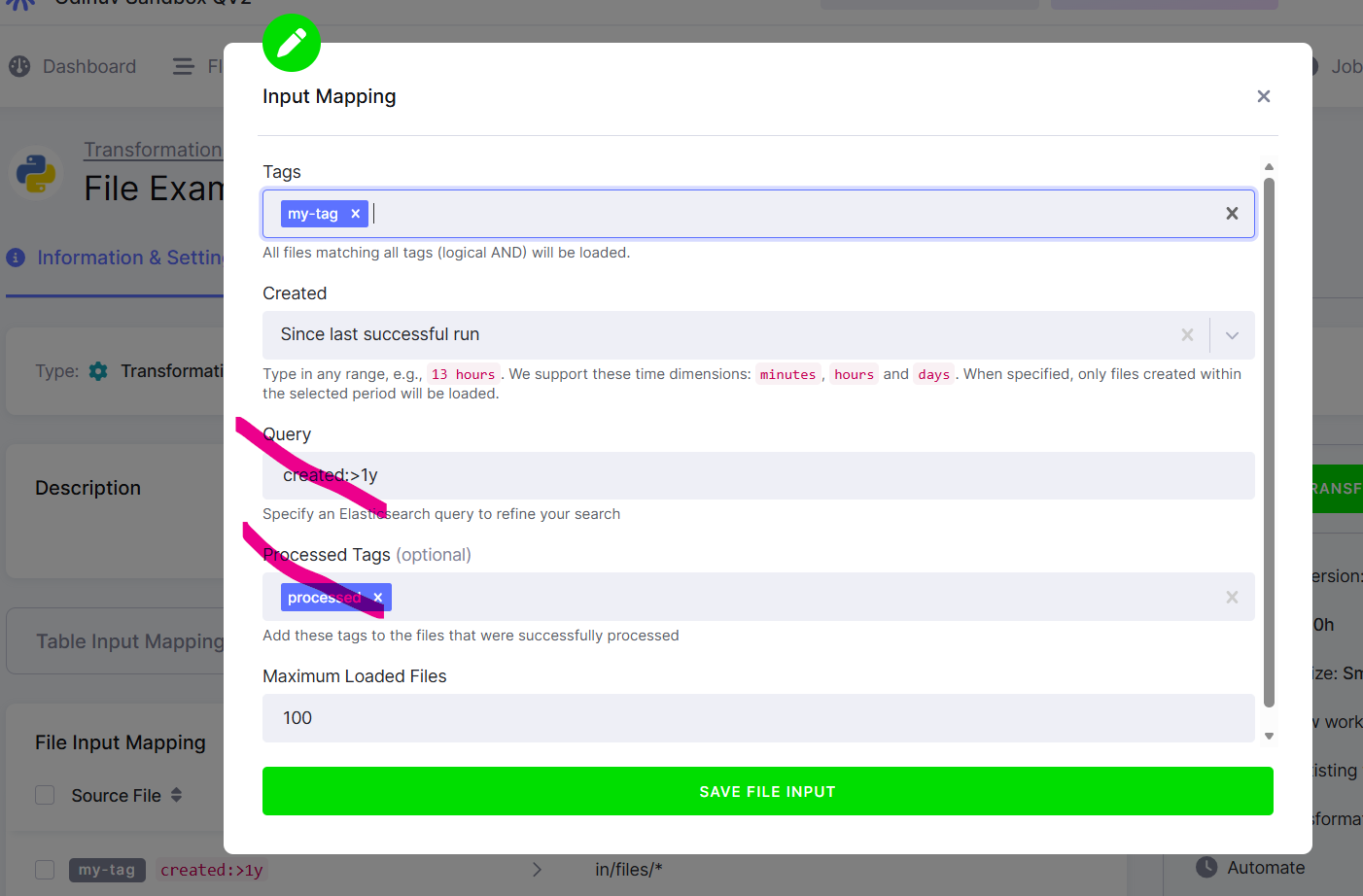
Who this affects: configurations using File Input Mapping — in practice, a small number of Python transformations and custom components. SQL transformations and anything that doesn't read files from Storage are unaffected and can ignore this post.
What's changing
- Processed tags — the option that tagged each file after a job consumed it (e.g.
downloaded) so the next run could exclude it via aNOT downloadedfilter. - Query — the free-form metadata query field on file inputs.
Both are being removed from the UI for new configurations. Existing API/JSON payloads are still accepted today, but should not be used going forward. We will give at least 60 days' notice before any breaking change and will work with affected projects 1:1 beforehand.
Why
Both options are incompatible with Storage branches (isolated file storage per development branch). They cannot be made to behave consistently across production and branch storage, and the supported alternatives below cover the same use cases. Processed tags have additionally been superseded by Created: Last successful run (adaptive file input mapping), which handles incremental file processing on the platform side.
What you need to do
- Existing configurations using Processed tags or Query: nothing right now. Your jobs keep running. CSM will contact you with a migration path.
- New configurations: use Created: Last successful run for incremental file processing, and Tags / File IDs for filtering. The UI no longer offers Processed tags or Query for new configurations.
- Questions: reach out to your Customer Success Manager or
support@keboola.com.
What to use instead
- Replacing Processed tags → Created: Last successful run. Use this for any new configuration that needs incremental file processing. For existing configurations, you can switch on your own, but be aware that the current "what's already processed" state lives in the file tags — changing the mode resets it, so the next run will reprocess everything. If that's a problem, wait for CSM to reach out with a migration plan.
- Replacing Query → Tags, Created, and File IDs. Most Query patterns reduce to a Tags filter combined with a Created cutoff. If your use case relies on a specific known set of files, list them explicitly as File IDs.
FAQ
Will my existing job stop working? No. Existing configurations keep running. We will give at least 60 days' notice before any breaking change, and CSM will work with you 1:1 before then.
Does this affect SQL transformations or components that don't read files? No. Only configurations that use File Input Mapping are affected.
Is this related to storage branches? Yes. On 20 May 2026 we briefly enabled storage branches on projects where Processed tags were in use; we rolled that back the same day for affected projects. We are now resuming the rollout while excluding projects that still depend on Processed tags, so you should not see further disruption.
Can I keep using Processed tags or Query? On projects where storage branches are not enabled, yes, for now. We do not recommend building anything new on either; the alternatives above are the supported path.