
Action Required: Migrate Snowflake Component Configurations to Key-Pair Authentication
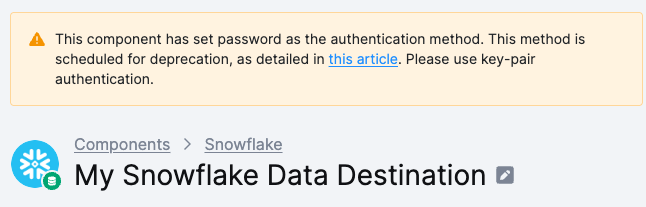
Snowflake is phasing out password authentication. Configurations of Snowflake-connecting components that still use passwords are now flagged directly in the project and on each affected configuration — switch them to key-pair authentication before they start failing.
Based on previous communication, Snowflake is phasing out single-factor password authentication. We've already migrated Snowflake SQL Workspaces, and now it's time for the components that connect to your own Snowflake account.
What's changing
To help you identify configurations that still need attention, warnings are now displayed both on the affected configuration and on the project home
page.
Which components are affected
The reminders cover all components that authenticate to your Snowflake account using a username and password:
- Snowflake Extractor (
keboola.ex-db-snowflake) - Snowflake Writer (
keboola.wr-db-snowflake, including the GCS/S3 variant) - Snowflake dbt Transformation – Remote (
keboola.dbt-transformation-remote-snowflake) - Snowflake Query History Extractor (
keboola.ex-snowflake-query-history) - Snowflake Parameters Extractor (
keboola.ex-snowflake-parameters) - Looker Writer (
keboola.wr-looker-v2) — when connected to a Snowflake source
Configurations that rely on Keboola-managed Snowflake workspaces (e.g. Snowflake SQL Transformation, local dbt) are not affected — Keboola handles their authentication for you.
What you need to do
- Open any flagged configuration.
- In the credentials section, switch Authentication Type from Password to Key-pair.
- Paste the private key associated with the Snowflake user. See the Snowflake key-pair documentation
(https://docs.snowflake.com/en/user-guide/key-pair-auth) for how to generate one. - Save and test the configuration run.

The warnings disappear automatically once the configuration uses key-pair authentication.
Why now
Snowflake will block password-based authentication entirely later in 2026 (Snowflake announcement). Configurations not migrated by then will start failing at run time. Migrating early avoids surprise outages and keeps your data flows running uninterrupted.
If you operate dozens of configurations or need help planning a coordinated migration, contact your Customer Success Manager.